Windows XP Registry Settings | Change Windows Media Player Title Bar
posted by: Dennis Aguilar
This Windows XP Registry Setting allow you to change the Windows Media Player title bar, so for example i put [denznet dot com] then it would display: “Windows Media Player provided by denznet dot com” on Media Player Title Bar.
[Start] [Run] [Regedit]
Registry Key: HKEY_CURRENT_USER\Software\Policies\Microsoft
Create the Key [WindowsMediaPlayer].
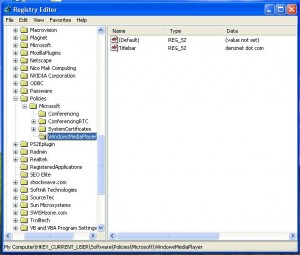
Modify/Create the Value Name [TitleBar] according to the Value Data listed below.
- Data Type: REG_SZ [String Value] // Value Name: TitleBar
- Value Data: [Enter the text to be displayed in the title bar.
Note: Whatever text you enter as the value data will be preceded by: Windows Media Player provided by, so if I had entered text of [denznet dot com], it would read: Windows Media Player provided by denznet dot com

Exit Registry and Reboot.
I’m sorry about the size of the image, but written on the title bar if you look closely is “Windows Media Player provided by denznet dot com”. Hope this helps. :-)
You might also like
|
|
|
|
|